If you want a privacy-focused caller ID app that protects your address book without selling your data or cluttering your screen with aggressive ads, I recommend you choose Hiya.
But if you want the largest global contact database with powerful spam protection, SMS filtering, and community reporting, you should choose Truecaller.
I tested both apps across multiple devices to analyze spam detection accuracy, battery drain, and contact privacy.
In this comprehensive comparison, I will help you decide which caller ID app best protects your privacy while blocking unwanted spam calls effectively.
| Feature | Hiya Caller ID & Block | Truecaller |
| Primary Focus | Privacy-first caller ID and spam protection | Global contact identification and messaging directory |
| Contact Directory Model | First-party and carrier database integration | Crowdsourced contact book syncing |
| Data Privacy Approach | Does not sell contacts or build public reverse lookups | Syncs contacts into a searchable public directory |
| Ad-Supported Free Tier | Clean interface with minimal intrusive ads | Heavy ads and sponsored banners on free plan |
| Carrier Partnerships | Powers native spam engines for AT&T, Samsung, and EE | Direct app-based caller identification |
| SMS Filtering Capability | Basic text message spam identification | Comprehensive SMS spam filter and categorized inbox |
| Spam Database Size | Over 250 million phone numbers | Over 4 billion phone numbers globally |
| Call Recording Feature | Limited or carrier-dependent | Native call recording on supported regions and plans |
My Real World Testing Experience With Both Caller ID Apps
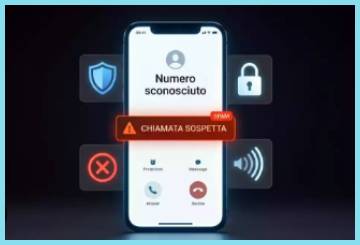
Testing these two caller ID titans on my daily driver smartphone gave me clear insights into how they manage incoming calls.
I started my evaluation with Hiya, installing it on my primary device to monitor spam filtering during busy work hours.
The installation process was fast, requiring only essential permissions to identify calls without asking me to upload my personal phonebook to a public cloud.
During my first week, Hiya seamlessly caught incoming robocalls from spoofed local numbers and flagged them with clear warning labels on my lock screen.
I appreciated how quietly Hiya operated in the background without draining my device battery or popping up annoying advertisement banners.
When I switched over to Truecaller, the immediate difference was the sheer speed and detail of caller identification.
Truecaller identified almost every unknown number that dialed my phone, displaying names for local delivery drivers, small businesses, and unregistered contacts.
Its crowdsourced directory identified incoming calls that other apps missed completely, giving me instant context before answering.
However, the free tier of Truecaller bombarded my screen with intrusive video ads and promotional banners after every completed call.
I also noticed that Truecaller requested extensive permissions, including full contact list synchronization to power its global search registry.
If you want a lightweight caller ID utility that respects your personal contacts and provides quiet background security, Hiya is an outstanding choice.
If you need maximum contact identification coverage across international numbers and want integrated SMS management, Truecaller takes the lead.
Contact Directory Models and Data Privacy Standards
Analyzing the underlying architecture of both platforms reveals fundamentally different philosophies regarding user privacy.
Hiya builds its identification engine using direct partnerships with major telecom carriers, business registries, and verified public databases.
When you install Hiya, the app does not force you to upload your personal address book to make it searchable by total strangers.
This privacy-first design ensures that your friends and family members do not have their names or phone numbers exposed without their consent.
Hiya complies strictly with international data protection regulations like GDPR, storing minimal personal telemetric data on its servers.
Truecaller operates on a crowdsourced database model where millions of users upload their entire address books during account creation.
This collective data aggregation allows Truecaller to identify billions of unknown phone numbers across the globe with incredible accuracy.
However, this crowdsourced system means that your name and contact details might appear in Truecaller’s public search index even if you never installed the app yourself.
Truecaller offers an unlisting portal on their website, but removing your entry requires manual effort.
While Truecaller provides superior contact matching, users who prioritize personal data sovereignty often find Hiya’s privacy model far more reassuring.
Spam Detection Accuracy and Real-Time Call Screening
Evaluating call protection performance side by side demonstrates how both applications handle aggressive telemarketers.
Hiya leverages its proprietary engine to analyze call patterns, network traffic, and real-time user reports to block malicious robocalls.
Its integration with mobile carriers like AT&T and Samsung Smart Call allows it to catch dangerous scam calls directly at the network layer.
When a call comes in, Hiya displays a color-coded warning overlay indicating whether the caller is safe, suspected spam, or a confirmed fraud threat.
In my tests, Hiya successfully blocked auto-dialed neighbor-spoofing calls without delaying the incoming call notification screen.
Truecaller uses a dynamic community-driven flagging mechanism where millions of active users mark unwanted callers in real time.
The moment a scammer targets multiple users in a specific region, Truecaller updates its global spam index within seconds.
Truecaller also displays a spam statistics meter, showing you how many times a specific number has been flagged and what time of day they usually dial.
This detailed context helps you decide whether an incoming unknown number is an urgent business call or a persistent debt collector.
If you prefer automated, carrier-grade blocking that stops fraudulent calls silently, Hiya provides reliable security.
If you want community-backed intelligence that shows call frequency charts and user comments before picking up, Truecaller excels.
User Interface, Battery Consumption, and Ad Experience
Navigating both mobile applications highlights stark differences in visual design and system resource usage.
Hiya features a clean, minimalist user interface focused entirely on call logs, blocklists, and reverse number lookups.
The app contains zero flashiness, maintaining a dark mode aesthetic that blends seamlessly into iOS and Android system designs.
Because Hiya avoids heavy background polling and intrusive ad networks, its impact on daily battery endurance remains nearly unnoticeable.
You can leave Hiya running in the background for days without seeing it appear on your battery usage status screen.
Truecaller delivers a feature-packed super-app interface that combines caller ID, SMS messaging, flash messaging, and banking payments in select regions.
While having an all-in-one communications hub is convenient, the interface can feel cluttered and overwhelming for users who only want call blocking.
The free version of Truecaller displays full-screen pop-up advertisements, full-banner ads in the call history, and frequent upgrade prompts to its Premium subscription tier.
These constant ad requests consume extra mobile data and cause measurable background battery drain on older smartphone models.
If you want an ad-free or low-ad experience that preserves battery health, Hiya delivers a smooth experience.
If you do not mind viewing occasional advertisements in exchange for a rich feature ecosystem, Truecaller provides broader capabilities.
Maintenance Tips for Caller ID and Spam Filter Apps
Proper maintenance ensures your caller ID app maintains an updated spam database and functions smoothly without missing legitimate calls. You should follow these practical steps to optimize your call protection performance.
- Permissive System Settings and Battery Optimization
Ensure your phone’s operating system does not restrict your caller ID app from running in the background.
On Android devices, go to your settings menu, locate the battery optimization section, and set Hiya or Truecaller to unoptimized or unrestricted.
This prevents the operating system from killing the caller ID process when your phone enters sleep mode, ensuring instant caller identification during incoming calls.
On iOS devices, make sure Background App Refresh is enabled under your device settings.
- Regular Database Updates and Off-Line Protection
Update your spam database regularly to catch newly generated scam numbers before they dial your phone.
Open your caller ID app at least once a week while connected to a reliable Wi-Fi network to download the latest offline spam definitions.
If you use Truecaller, enable automatic offline database updates in the app settings so that spam caller identification works even when you travel through areas with weak cellular data coverage.
- Reviewing Blocklists and False Positive Management
Periodically review your blocked call log to ensure legitimate callers are not accidentally getting rejected by aggressive filters.
If a doctor’s office, delivery service, or family member gets flagged as spam, mark the number as safe or add it to your contacts list immediately.
Customize your protection threshold settings inside the app to allow unknown numbers through while blocking only verified high-risk fraud callers.
Corporate Environments, International Travel, and Everyday Usage
Selecting the right caller ID software depends heavily on your daily communication habits and privacy requirements.
If you handle sensitive corporate data or work in regulated industries like finance, legal, or healthcare, Hiya is the safer selection.
Hiya’s strict privacy controls ensure you will not inadvertently breach confidentiality by syncing business contact lists to a public server.
Hiya is also ideal for minimalists who want native-feeling call protection without altering their default smartphone dialer.
If you travel internationally, conduct cross-border business, or receive dozens of unknown calls daily from overseas suppliers, Truecaller is unmatched.
Truecaller’s global database recognizes numbers across Asia, Europe, Africa, and the Americas that smaller directories miss entirely.
Its integrated SMS spam filter is also a lifesaver in regions plagued by smishing texts and unwanted marketing blasts.
If you want privacy, clean software, and corporate safety, choose Hiya.
If you want maximum contact discovery, international coverage, and rich messaging tools, choose Truecaller.
Also Read: My Thoughts On Hiya Multivitamin
Pros and Cons of Hiya Caller ID & Block
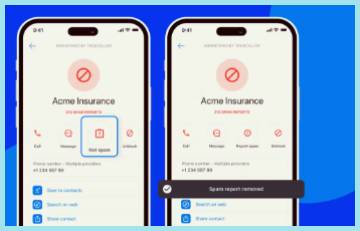
Pros of Hiya Caller ID & Block
- Privacy-Focused Architecture: Does not upload or share your personal contact book with a public searchable registry.
- Clean Ad-Free Experience: Provides a clutter-free interface without intrusive full-screen video ads or aggressive pop-ups.
- Carrier-Grade Partnerships: Powers native spam detection engines for major telecommunications networks worldwide.
- Minimal Battery Drain: Lightweight background operation causes negligible impact on daily smartphone battery health.
- Accurate Robocall Blocking: Automatically flags and blocks neighbor-spoofing scams and automated telemarketing dials.
- Transparent Data Policies: Full compliance with global privacy regulations without harvesting non-user phone numbers.
Cons of Hiya Caller ID & Block
- Smaller Global Database: Identifies fewer international or private residential numbers compared to crowdsourced networks.
- Limited SMS Filtering: Basic text spam detection lacks advanced folder categorization for incoming messages.
- Feature Set Focus: Lacks secondary communication features like call recording or built-in flash messaging.
Pros and Cons of Truecaller
Pros of Truecaller
- Massive Global Directory: Identifies over four billion phone numbers using an extensive crowdsourced database.
- Detailed Spam Context: Displays user comments, call frequency meters, and spam category breakdown for unknown numbers.
- Integrated SMS Inbox: Filters text spam automatically while organizing personal, transactional, and promotional messages.
- Smart Dialer & Call Recording: Offers built-in dialer options and regional call recording capabilities for active conversations.
- Community-Driven Updates: Instantly updates spam flags when multiple users report a fresh scam number.
- Cross-Platform Synchronization: Syncs your call block preferences smoothly across multiple devices under one account.
Cons of Truecaller
- Contact List Harvesting: Requires access to your contact list, uploading phone numbers to a searchable directory.
- Intrusive Ad Experience: Free tier contains heavy video advertisements, promotional banners, and frequent upsell pop-ups.
- Higher Battery Usage: Resource-intensive background background processes consume more battery life and system memory.
Also Read: Comparison Of Hiya Vs. First Day
Frequently Asked Questions (FAQs)
Hiya is better than Truecaller for users who prioritize personal data privacy, as Hiya does not harvest or upload contact books to a public searchable directory while offering an ad-free interface.
Yes, Hiya is a highly trustworthy app that partners directly with major telecom carriers like AT&T and phone manufacturers like Samsung to provide carrier-grade spam protection without selling user contact lists.
Truecaller has faced regulatory inquiries and investigations in various jurisdictions concerning data protection compliance, user consent practices for contact book syncing, and regional tax audits regarding international transfer pricing.
Yes, Hiya caller ID is completely safe to use because it operates strictly within mobile operating system permissions, encrypts user data, and does not expose your personal contacts to public search databases.
Final Thoughts
Selecting between these two top-tier call protection applications comes down to how much value you place on personal privacy versus global contact identification.
If you want a privacy-focused, ad-free caller ID tool that safeguards your address book while blocking robocalls reliably, I recommend you buy or download Hiya today.
However, if you want the largest contact database on earth, comprehensive SMS filtering, and community-driven spam intelligence, you should choose Truecaller right now.
Both apps offer powerful tools that will help you take back control of your phone and stop annoying telemarketers forever.