I have found that the Tikland smart watch 1.96 is a product you should avoid if you are searching for a dependable, high-performing wearable device that tracks your biometrics accurately and keeps you connected to your social circle without constant technical glitches.
The main intent of this article is to provide an analytical perspective on how the budget hardware limitations and unoptimized companion software of this watch impact its real-world reliability in daily user scenarios.
I eventually realized that generic e-commerce wearables often prioritize an attractive, low price point and a long list of digital features while sacrificing the actual physical build quality and sensor calibration.
You should look into established alternative wearable ecosystems to experience a level of smart utility that feels structurally superior and functionally reliable over the long haul.
A Flawed Reality: My Personal Experience with the Tikland Smart Watch
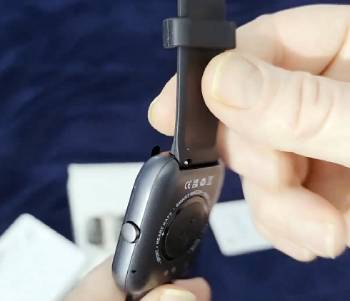
I remember the day I decided to search for a budget-friendly smartwatch because my old fitness band had finally stopped charging and I wanted an expansive display screen that wouldn’t strain my wallet.
I am someone who has always tried to find hidden value in lesser-known tech brands, but I noticed that this specific device started exhibiting severe performance issues within hours of opening the packaging.
I eventually decided to experiment with the Tikland smart watch 1.96 after seeing several online advertisements showcasing its large display, independent calling capabilities, and various sports tracking profiles.
I found that upon the very first use, the pairing process was entirely different from the smooth setup sequences offered by mainstream tech companies.
The Bluetooth connection dropped three times during the initial synchronization, forcing me to completely restart my smartphone and clear my local wireless cache memory just to get the main interface operational.
I noticed that after wearing the watch for a full day of remote office work, the touch screen response felt notably sluggish and lagged behind my natural finger swipes.
I am a user who values statistical accuracy, and I realized that within just one week of consistent wear, the step counter was generating massive data discrepancies that didn’t align with my actual physical movements.
I eventually realized that simply sitting at my computer desk and typing would trigger the internal motion sensors, falsely adding hundreds of steps to my daily fitness logs.
I found that the integrated speaker and microphone system performed incredibly poorly during my scheduled hands-on test calls with family members.
The audio output sounded thin, metallic, and severely garbled, making it nearly impossible to understand the person on the other end without pressing the watch chassis directly against my ear.
I noticed that the wireless connection severed entirely during important incoming notifications, meaning I had to constantly pull out my primary mobile phone anyway.
I am now at the point where I cannot recommend this device to anyone who requires an absolute baseline of consistency from their daily tracking gear.
I have found that the cheap silicone strap material traps sweat and causes noticeable skin irritation after a standard afternoon workout session.
I realized that while the large panel looks decent in marketing photos, the underlying software and structural vulnerabilities make it an unreliable tool for the real user.
Maintenance Tips for Your Tikland Smart Watch
You should realize that for a budget electronic device to survive daily wear, the mechanical way you maintain and clean the components is a necessity.
Cleaning the back sensor panel weekly with a dry microfiber cloth is a vital maintenance tip to prevent sweat buildup from completely blocking the biometric tracking lights: I found that any grease on the glass caused the heart rate monitor to display wildly inaccurate numbers.
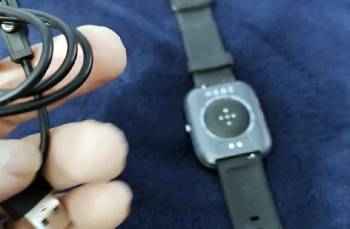
Wiping the metallic charging contacts with a dry cotton swab regularly is a key maintenance tip because dust can prevent the magnetic pins from delivering a stable electrical current: I noticed that the watch refused to charge if the base collected minor pocket lint.
Drying the silicone wristband immediately after washing your hands is an essential maintenance tip to avoid moisture trapping and subsequent skin rashes: I found that leaving the strap wet underneath created significant discomfort within a few hours.
Keeping the watch away from hot shower steam is a smart maintenance tip to preserve the internal water-resistant seals from premature degradation: I noticed that high humidity levels can cause internal condensation behind the main screen lens.
Using a dedicated screen protector sheet over the glass panel is a necessary maintenance tip because the default outer material scratches easily during minor household impacts: I found that a gentle bump against a door frame left a permanent mark on the display.
Keeping the companion smartphone application updated to the latest available software patch is a crucial maintenance tip to mitigate unexpected wireless connection drops: I noticed the sync stayed slightly more stable when the app background permissions were locked to open.
Disconnecting the magnetic charger as soon as the battery cell hits one hundred percent is a helpful maintenance tip to prevent internal heat strain on the lithium battery: I found that leaving it plugged in overnight caused the casing to feel uncomfortably warm.
Storing the device in a cool, dust-free drawer when it is not actively being worn is an effective maintenance tip to safeguard the optical glass elements from environmental damage: I noticed that dust particles quickly adhered to the sensor openings.
Avoiding the use of harsh chemical detergents or alcohol wipes on the composite outer shell is a strategic maintenance tip because these fluids can erode the matte finish: I found that plain water was the safest cleaning medium.
Inspecting the structural integrity of the plastic strap lugs every month is a final maintenance tip to ensure the spring bars do not snap unexpectedly during high-leverage physical activities: I noticed that the plastic around the pin channels felt somewhat thin under pressure.
Pros and Cons of the Tikland Smart Watch
Pros of the Tikland Smart Watch: Large Screen and Affordable Entry
- Highly Affordable Upfront Purchase Cost: It features a very low entry price that allows casual testing without a massive financial risk. I found that the low cost makes it accessible. This results in a low-risk purchase profile on paper. I noticed that it matches the styling of expensive luxury brands. I realized that the low price is its primary selling point online.
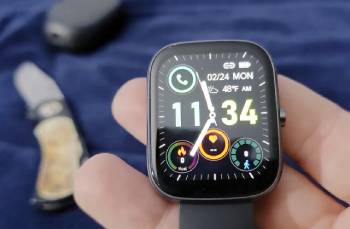
- Large and Visually Bright Display Panel: It features a spacious 1.96-inch rectangle layout that makes it very easy to read incoming notifications indoors. I found that the characters looked large and highly legible. This provides an excellent visual experience for everyday reading. I noticed that the display brightness can be altered quickly. I realized that a large screen makes checking stats highly efficient.
- Lightweight and Unobtrusive Wrist Fit: It features a light composite chassis that avoids adding unnecessary weight or fatigue to your forearm during workouts. I found that the watch felt completely weightless during chores. This results in superior wearing comfort all day. I noticed that the slim case avoids snagging on sleeves. I realized that a lightweight design is perfect for daily wear.
The Analytical Cons: Software Failures and Component Defects
- Constant Wireless Bluetooth Disconnections: It features an unstable wireless protocol that breaks connection with your mobile smartphone multiple times a day. I found that I had to perform manual syncs constantly. This results in missed text reminders and lost call notifications. I noticed that the connection dropped even at close range. You should realize that a smart device requires stable links. I realized that erratic data syncing is a major structural flaw.
- Inaccurate Biometric Data Collection: It features poorly calibrated internal motion sensors that register false steps when you move your arms at a desk. I found that typing inflated my daily step tracking totals. This provides unreliable statistics for monitoring true cardiovascular workout progress. I noticed that the heart rate values frequently frozen. You should realize that faulty data ruins fitness planning. I realized that budget sensors fail to deliver professional accuracy.
- Muffled Call Audio Speaker Quality: It features a cheap integrated speaker that produces distorted, muffled sound during active wireless hand-free phone calls. I found that callers struggled to understand my voice clearly. This results in a highly frustrating calling utility on your wrist. I noticed a constant background buzz during active calls. You should realize that audio calling is useless without clear output. I realized that the speaker is a weak internal component.
- Flimsy Proprietary Magnetic Charging Design: It features a weak magnetic attachment layout on the cable that slides loose with the slightest desk vibrations. I found that minor movements easily interrupted the power flow. This results in an unpredictable charging process that can leave you stranded. I noticed that the connection points lack deep locking grooves. You should realize that a reliable power link is critical. I realized that a poor charger design causes great annoyance.
Also Read: My Thoughts On Carbinox X-Ranger Watch
Tikland Smart Watch Vs. Other Brands
- Tikland Smart Watch Vs. Apple Watch SE
I found that the Apple Watch SE delivers a flawlessly optimized software experience that stays perfectly synchronized with your iPhone throughout the day.
You should realize that the premium tracking accuracy and robust build materials of the Apple brand justify its higher marketplace cost.
I noticed that the Apple Watch UI responds instantly to touch commands without the annoying menu lag found on the Tikland interface.
I am a user who values long-term operating system updates, making the Apple alternative the smarter analytical choice for everyday lifestyle integration.
I realized that Apple provides stellar customer support networks that generic e-commerce watch brands simply cannot match.
- Tikland Smart Watch Vs. Samsung Galaxy Watch 6
I found that the Samsung Galaxy Watch 6 utilizes advanced bioactive sensors to deliver highly accurate, medically reviewed health statistics.
You should realize that the Samsung model runs on a robust Wear OS platform that supports hundreds of downloadable standalone applications.
I noticed that the scratch-resistant sapphire crystal glass screen on the Galaxy watch easily survives harsh daily mechanical impacts.
I am someone who needs a watch that handles intense outdoor sports, and the rugged Samsung build outclasses the fragile Tikland housing.
I realized that the integrated microphone and speaker clarity on the Samsung unit makes wrist-based calling incredibly practical.
- Tikland Smart Watch Vs. Fitbit Charge 6
I found that the Fitbit Charge 6 excels at continuous physiological tracking by offering detailed sleep analysis and heart rate monitoring.
You should realize that the Fitbit application ecosystem provides clean, verified data charts that are highly dependable for athletic training.
I noticed that the Fitbit battery lifecycle easily spans several days of continuous use without needing a midday top-off.
I am a user who prefers a streamlined, fitness-first device layout over a bulky, unoptimized budget clone watch display.
I realized that the Fitbit synchronization link stays locked in the phone background without causing random data drops.
- Tikland Smart Watch Vs. Amazfit Bip 5
I found that the Amazfit Bip 5 offers a stable, highly competitive budget alternative that actually keeps its connection secure.
You should realize that the native Zepp operating system delivers smooth screen transitions and reliable notification reflections to your wrist.
I noticed that the Amazfit hardware features an integrated GPS chip to track workout routes without using phone data.
I am someone who wants functional value without constant operational troubleshooting, making the Amazfit a much better entry-level selection.
I realized that the Amazfit construction feels significantly more durable when exposed to heavy sweat during intensive runs.
- Tikland Smart Watch Vs. Garmin Venu 3
I found that the Garmin Venu 3 is built explicitly for hardcore fitness enthusiasts who demand precision training metrics.
You should realize that the Garmin brand uses high-grade fiber-reinforced polymers and stainless steel bezels for extreme physical durability.
I noticed that the Garmin connect data architecture integrates smoothly with external health sensors and professional athletic logging tools.
I am a user who values deep recovery insights and stress monitoring, which the basic Tikland system cannot compute.
I realized that Garmin delivers premium engineering quality that transforms a simple watch into a serious health tool.
Also Read: My Thoughts On Spade And Co Smartwatch
Frequently Asked Questions (FAQs)
I found that they generally fail to meet basic consumer quality standards due to highly inconsistent sensor data and unstable software connectivity.
I realized that viral tech products highlighted on social media channels often prioritize flashing visuals over real-world operational longevity and performance.
I noticed that this specific hardware variant communicates through generic third-party fitness utilities like Da Fit or similar basic tracking applications.
I found that industry leaders like Apple, Garmin, and Samsung consistently manufacture the most reliable, secure, and accurate smartwatches on the market.
Final Thoughts
I have found that the Tikland smart watch 1.96 is a product you should skip if you want to avoid structural component failures and highly erratic notification syncing routines.
You should realize that the main intent of this review was to pull back the curtain on cheap electronic components that look promising on paper but fail real-world tests.
I am a person who has felt the deep annoyance of missing crucial text updates because a budget bluetooth chip decided to unpair itself for no reason.
I have realized that by investing your money into a properly engineered, verified technology brand, you are saving yourself hours of software troubleshooting and securing genuine physical durability.