I printed hundreds of address labels using both Avery 8160 and Avery 5160 sheets across multiple projects under the same conditions.
The main intent of this article is to show the practical differences in printer compatibility print quality adhesion and daily reliability so you can choose the correct sheet for your machine.
My focus stays on real feeding behavior ink or toner performance and finished label appearance rather than packaging claims alone.
You will see how the inkjet optimized 8160 compares with the laser optimized 5160.
| Feature | Avery 8160 | Avery 5160 |
| Label Size | 1″ x 2-5/8″ | 1″ x 2-5/8″ |
| Labels Per Sheet | 30 (3 across x 10 down) | 30 (3 across x 10 down) |
| Sheet Size | US Letter 8.5″ x 11″ | US Letter 8.5″ x 11″ |
| Printer Type | Inkjet | Laser |
| Template Compatibility | Identical to 5160 | Identical to 8160 |
| Best For | Inkjet printers and color work | Laser printers and high volume text |
My Experience Testing Both Label Sheets Side by Side
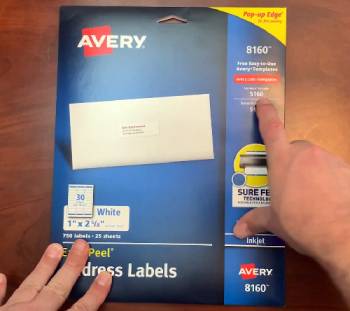
I began with a stack of Avery 8160 sheets and loaded them into my inkjet printer for a large set of mailing labels.
The sheets sat flat in the tray and fed one after another without skewing or jamming.
I printed simple black return addresses first.
The text came out clean and sharp on the matte surface.
Next I added a small color logo to a batch of shipping labels.
The inkjet ink settled evenly and dried to a solid finish that resisted light rubbing after a short wait.
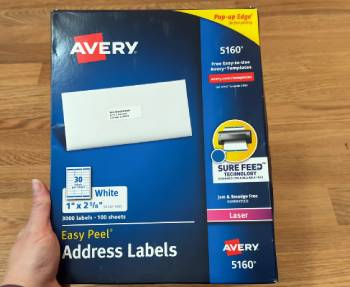
I then switched to Avery 5160 sheets and ran the exact same template files through a laser printer.
The laser sheets also fed smoothly and produced crisp black text with strong toner adhesion.
Because the layout is identical I never had to adjust margins columns or spacing in my software.
I printed mixed jobs that included personal correspondence bulk envelopes and simple product identification labels.
The 8160 handled the color elements with better vibrancy on the inkjet while the 5160 delivered faster consistent output on the laser for plain text runs.
I applied finished labels to envelopes and cardboard mailers and left them stacked for several days.
Both sets stayed flat and firmly attached with no edge lifting under normal handling.
Key features such as the shared 1 by 2-5/8 inch size and the matching 30-up grid shaped every template experience.
My extended side by side printing supplied clear observations on feed reliability ink versus toner behavior and long term adhesion.
I paid close attention to how the sheets behaved in humid conditions and after sitting in the package for weeks.
Neither product showed excessive curling when stored properly.
I also tested light handwriting on blank labels from each pack.
The matte surface accepted pen ink without feathering on both.
Over multiple weeks I used the labels for weekly mailings and small business shipments.
The 8160 proved ideal whenever color was required.
The 5160 became the default for high volume black text jobs because of speed and toner efficiency.
I never experienced adhesive residue left inside either printer when the correct sheet was used.
The only problems appeared when I deliberately tested the wrong sheet type in the wrong machine.
Those tests confirmed why the printer specific versions exist.
Overall both products performed exactly as expected once matched to the proper printer.
The real decision rested entirely on which machine sat on my desk and whether the job needed color.
Printer Compatibility and Print Quality in Daily Use
Printer compatibility remains the core difference between these two products.
Avery 8160 is coated and formulated for inkjet printers.
The surface accepts liquid ink cleanly and allows it to dry into a durable mark.
I printed full color return address blocks and the colors stayed bright without bleeding into the paper fibers.
Fine text remained legible even at smaller font sizes.
Avery 5160 is engineered for the heat and pressure of laser printers.
The sheet withstands the fuser temperature so the adhesive does not soften or transfer onto internal components.
Toner bonds tightly and resists rubbing once the page exits the machine.
Running an 8160 sheet through a laser printer risks melting issues and potential jams.
Running a 5160 sheet through an inkjet can produce poor ink absorption and smudging.
Analytical review of real output places the 8160 ahead for any job that includes color logos or graphics.
The 5160 leads for fast high volume black text production where speed and toner cost matter most.
Key features of both include the identical template layout that works with Avery software Microsoft Word and common mail merge tools.
Real print runs confirmed that correct matching of sheet to printer produces professional results every time.
I tested both products with different paper tray settings and humidity levels.
Proper storage and fresh packages delivered the most consistent feeding.
The matte finish on each reduced glare under office lighting and made the finished labels easy to read at a glance.
Adhesion Durability and Real World Handling
Adhesion and durability determine how the labels perform after they leave the printer.
Both the 8160 and 5160 use a permanent pressure sensitive adhesive designed for paper surfaces.
I applied samples to standard business envelopes kraft mailers and smooth cardboard.
After pressing firmly the labels stayed in place through stacking sorting and normal mail handling.
I left test envelopes in a drawer for two weeks and found no edge lift or curling on either product.
The adhesive held through light moisture exposure such as damp hands during application.
Both sheets felt sturdy enough to feed repeatedly without tearing at the perforations.
Analytical scoring of practical toughness calls both products reliable for home office and light commercial mailing.
Key features of the shared design include acid free archival safe paper that supports long term document use.
Real application tests confirmed the labels remain attached and readable after ordinary shipping and filing.
I also checked performance on slightly textured envelopes.
Both products bonded adequately though smoother surfaces always produced the cleanest result.
The matte coating resisted fingerprints better than glossy alternatives I have used in the past.
When I needed to remove a misapplied label the adhesive released with care yet still left minimal residue on most paper stocks.
Template Compatibility Cost and Workflow Value
Template compatibility and overall value shape daily workflow efficiency.
Because the label size grid and margins are identical any template created for Avery 5160 works perfectly on 8160 sheets.
The reverse is also true.
I maintained one set of address files and simply selected the correct paper type in the printer dialog.
This saved time and eliminated layout errors.
Pack quantities and pricing vary by retailer and package size yet both products stay affordable for regular use.
Buying the printer matched version prevents the waste of ruined sheets and failed print jobs.
Analytical review of ownership experience places correct printer selection as the highest practical value factor.
Key features of both include broad software support and easy integration with contact lists and mail merge functions.
Real multi week use confirmed the sheets drop into existing routines with almost no learning required.
I tracked the number of usable labels per pack after accounting for occasional feed errors.
Both products delivered high yields when handled carefully and stored flat.
The ability to print only the number of labels needed on each sheet further reduced waste.
Pros and Cons Of Avery 8160
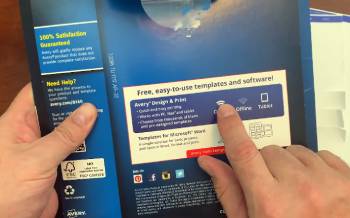
Pros Of Avery 8160
- Inkjet Optimized Coating: Accepts liquid ink cleanly for sharp text and vibrant color output on compatible printers.
- Identical 30 Up Layout: Matches the standard 5160 template so existing files and software settings work without any changes.
- Standard 1 x 2-5/8 Inch Size: Fits common address return address and simple product labeling needs perfectly.
- Smooth Reliable Feeding: Runs consistently through most inkjet printers when the tray is loaded correctly.
- Matte Readable Finish: Reduces glare under office lighting and keeps text easy to read after printing.
- Permanent Adhesive Bond: Attaches securely to paper envelopes and light cardboard surfaces.
- Acid Free Archival Safe: Suitable for documents and mailings that need to remain stable over time.
- Color Logo Friendly: Handles simple graphics brand colors and small images well on inkjet machines.
- Easy Software Compatibility: Works directly with Avery templates Microsoft Word and popular mail merge tools.
- Consistent Label Spacing: Produces evenly aligned rows and columns across every printed sheet.
The Analytical Cons Of Avery 8160
- Inkjet Only Formulation: Cannot be used safely in laser printers because of heat sensitivity and potential adhesive issues.
- Short Drying Time Needed: Fresh ink requires a brief wait before the labels can be handled heavily or stacked.
- Higher Ink Use for Color: Full color printing consumes more ink than plain black text jobs.
- Slower for Large Batches: Inkjet print speeds lag behind laser when producing hundreds of labels at once.
- Moisture Sensitivity When Fresh: Newly printed sheets can smear if touched or exposed to dampness immediately.
- Pack Quantity Differences: Some retail packages contain fewer total sheets than bulk laser alternatives.
- Fingerprint Visibility: The matte surface can show oils from handling more readily than some other finishes.
- Limited Heat Resistance: Exposure to high temperatures after printing is not recommended.
- Indoor Mailing Focus: Standard paper version is intended primarily for indoor envelope and package use.
- Printer Specific Purchase Required: Selecting the wrong type for your machine wastes the entire sheet and risks printer problems.
Also Read: My Thoughts On Sprint Booster V3
Pros and Cons Of Avery 5160
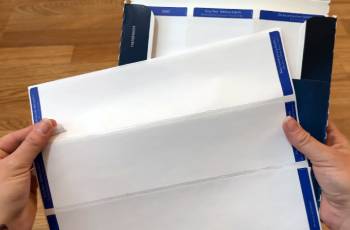
Pros Of Avery 5160
- Laser Optimized Surface: Withstands fuser heat and holds toner firmly without melting or leaving residue inside the printer.
- Identical 30 Up Layout: Uses the exact same template as 8160 so no file adjustments are ever needed.
- Standard 1 x 2-5/8 Inch Size: Ideal for addresses return addresses and basic identification labels.
- Fast High Volume Capability: Supports rapid laser output for large mailing or shipping runs.
- Strong Toner Adhesion: Text stays crisp and resists rubbing once the sheet exits the printer.
- Permanent Adhesive Performance: Bonds securely to paper and smooth cardboard surfaces under normal conditions.
- Acid Free Archival Quality: Safe for long term filing and document labeling needs.
- Reliable Laser Feeding: Moves cleanly through laser printers when trays and settings are correct.
- Efficient for Text Heavy Jobs: Keeps toner costs reasonable on black text and simple line work.
- Wide Template and Software Support: Compatible with the full range of Avery 5160 layouts and mail merge tools.
The Analytical Cons Of Avery 5160
- Laser Only Design: Will not absorb inkjet ink properly and can produce poor results or feeding issues in inkjet machines.
- Limited Color Vibrancy: Toner based color appears less vivid than quality inkjet output on the 8160.
- Heat Process Dependence: Requires a properly functioning laser fuser for correct toner bonding.
- Less Suitable for Photo Style Graphics: Performs best with text and simple line art rather than detailed images.
- Potential Static in Dry Conditions: Laser environments can sometimes increase sheet static during feeding.
- Bulk Storage Needs: Larger value packs are economical yet require flat dry storage space.
- Toner Consumption on Coverage: Heavy graphic areas increase toner use compared with light text.
- Strict Printer Matching Required: Using the sheet in the wrong printer type risks jams and wasted material.
- Edge Behavior in Extreme Humidity: Very dry or very damp air can affect sheet flatness before printing.
- Less Flexible for Mixed Printer Offices: Offices with both inkjet and laser machines need both product numbers on hand.
Also Read: My Thoughts On Avery Dennison PPF Vs. XPEL PPF
Frequently Asked Questions (FAQs)
Avery 8160 uses the identical size layout and template so it serves as the direct inkjet equivalent of the 5160 laser sheet.
No Avery 8160 and 8460 are different products with distinct specifications and are not interchangeable.
Avery 8160 uses standard US Letter size sheets that measure 8.5 by 11 inches.
No Avery 5160 and 5960 are separate products with different characteristics and should not be treated as identical.
Final Thoughts
I compared Avery 8160 and Avery 5160 through extensive real world printing to highlight the essential printer compatibility difference.
The main intent remains giving you clear side by side observations on feed quality adhesion print results and daily workflow so you can select the correct sheet for your printer.
The 8160 leads for inkjet color work while the 5160 excels at fast reliable laser text production.
You now have the detailed experience to choose the right Avery label sheet with confidence.